
Purchase Order Template: Fill In and Print PDF
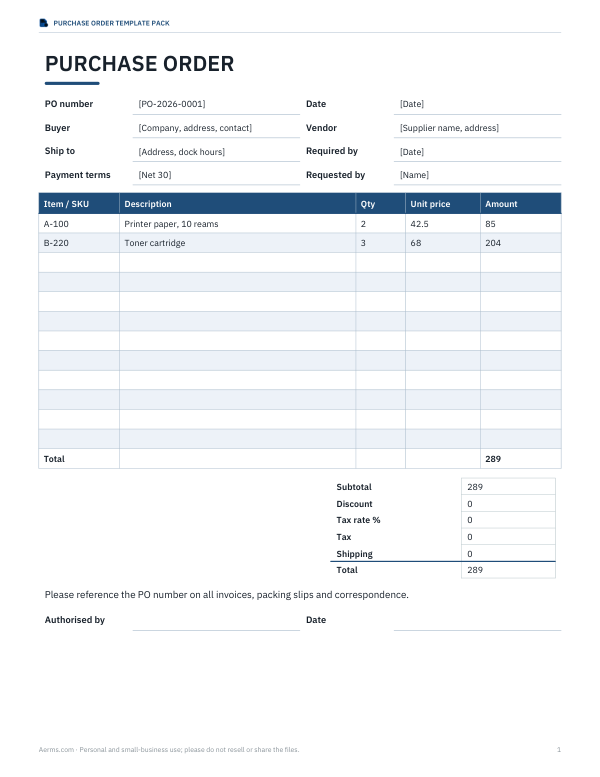
Fill in a purchase order template with buyer, vendor, delivery details and line items. The browser form calculates USD amounts, discount, estimated tax and shipping. Print the completed form, choose Save as PDF in the print dialog, or export its lines and totals as CSV.
- Free to use
- No sign-up
- Runs in your browser
Create a purchase order
| Item / SKU | Description | Qty | Unit price | Amount |
|---|
USD only. Line amounts round to cents, then tax is estimated on subtotal minus discount; shipping is added after tax. Confirm applicable tax treatment separately. Blank lines are ignored; partially completed lines must be fixed. Up to 200 lines.
Purchase Order Template Pack
6 files: 2 free PDFs, 1 editable Word form, 2 Excel workbooks and README. The $5 ZIP adds editable files; automatic arithmetic is in Excel only. Word and PDF amounts must be updated manually. No vendor database or automated sign-off.
- Purchase order (XLSX, DOCX, PDF)
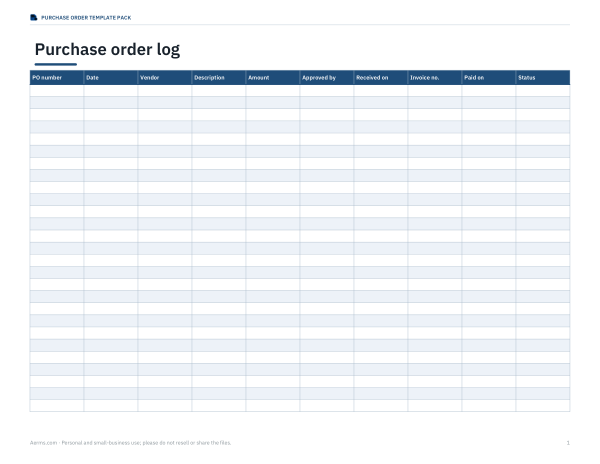
- PO log & receiving record (XLSX, PDF)
Formats: XLSX, DOCX, PDF. Instant download after payment (link valid 72 hours, up to 5 downloads). AI-assisted: the templates were drafted with AI help and reviewed and laid out before publishing.
$5.00 USD, one-time
- Instant download
- 7-day refund
- Secure checkout by Stripe
7-day money-back guarantee. Full refund within 7 days of purchase, even after you download.
Full refund within 7 days — see the refund policy and license.
Free printables
Single sheets you can print right now, no sign-up. The full pack adds every sheet in one download plus the editable files.
Fields in this purchase order template
| Section | Available fields |
|---|---|
| Order header | PO number, Date, Required by, Payment terms |
| Parties and delivery | Buyer, Vendor, Ship to |
| Line item | Item / SKU, Description, Qty, Unit price; calculated Amount |
| Totals | Tax rate %, Shipping, Discount; calculated totals |
| Extra text | Notes / instructions |
How the totals are calculated
Each quantity × unit price is rounded to cents before the line amounts are added. Discount is subtracted from the subtotal; the entered tax rate is applied to that difference and rounded to cents; shipping is added last. These are the form’s arithmetic rules, not a determination of applicable tax treatment.
Check a two-line example
Illustrative line items: quantity 2 at $42.50 and quantity 3 at $68.00. All values in the table are USD. These are example form inputs, not prices for this site’s digital files.
| Subtotal | Discount | Tax rate | Tax | Shipping | Total |
|---|---|---|---|---|---|
| 289.00 | 0.00 | 7% | 20.23 | 15.00 | 324.23 |
| 289.00 | 20.00 | 7% | 18.83 | 15.00 | 302.83 |
| 289.00 | 0.00 | 0% | 0.00 | 0.00 | 289.00 |
Complete the form before exporting
Use a description and a positive quantity for each used line. Completely blank lines are ignored; partial lines need completion or removal. The form accepts up to 200 lines, quantities up to six decimal places and prices or charges up to two. The browser output uses USD.
Purchase order, invoice and sales order
This template records the buyer’s purchase request to a vendor. It does not produce the seller’s invoice or a sales-order record. PO number, dates, addresses and terms are entered by you; there is no vendor lookup or accounting integration.
Print or save PDF
Click Print / save PDF after checking the totals. Select a printer or Save as PDF in your browser’s dialog. Download CSV exports the line items and totals; it does not export a formatted PDF or editable Word layout. Save a copy before closing the form.
Frequently asked questions
Is a purchase order legally binding?
This form records order details; it does not determine whether a particular agreement is legally binding. That depends on the applicable law, communications and agreed terms.
Do I need a PO for every purchase?
No. Many small businesses use POs for orders above a set amount or for new suppliers, and pay small routine purchases by card.
How should I number purchase orders?
Use a simple sequence, often with the year, such as PO-2026-0001, and keep a log of issued numbers.
Is my information saved?
No. The form works entirely in your browser and is cleared when you close the page. Print or save a PDF to keep a copy.
Can I add my logo?
The free form prints a clean text header. The free form has no logo uploader. You can edit the paid Word or Excel files to insert a logo and adjust the layout yourself.
What is a three-way match?
Comparing the PO, the receiving record and the invoice before paying, to confirm quantities and prices agree.
Can I enter a logo or choose another currency?
The browser form has no logo uploader or currency selector. It prints a text header and uses USD.
Does the form send the order to a supplier?
No. It prepares a printable document and CSV on your device; delivery to a supplier is outside this form.
Free files and editable pack
Both PDF forms are free to download. The optional $5 pack adds a manually editable Word PO and two Excel workbooks: a PO calculator, and a manual PO log with a receiving calculation. Excel calculates arithmetic but does not validate legal terms, vendor details or tax rules. Use one currency per order/log; the browser uses USD. Tax excludes shipping in this calculator. No accounting or vendor database integration.